
Module 3.1 – Part 2 on AI: Privacy Guidance from AIC and Prompting for Different Modalities
In the previous resource, we provided the basics of generative AI. This time, we will learn the privacy guidance from Australian Information Commissioner (AIC) and how to generate great prompts for different modalities to give accurate and effective results. By the end of this training, participants will be able to:
✅ Understand and address Australia’s concern on Privacy in using Public AI Tools
✅ Apply prompts in different modalities; text and images
✅ View examples of pro-level prompts for different modalities
This resource will cover the following:
- Section 1 – Office of Australian Information Commissioner (AIC): Guidance on privacy and the use of commercially available AI products
- Section 2 – Prompting for Different Modalities: Text and Images
- Section 3 – Examples of Pro-level Prompts for Texts and Images
Let’s dive in!
SECTION 1: Office of Australian Information Commissioner (AIC): Guidance on Privacy and the Use of Commercially Available AI products
Business owners in Australia have significant security and privacy concerns regarding the utilisation of the publicly available AI tools, and the Australian Government has acknowledged this issue. In the following resources, we present the guidance from the Office of the Australian Information Commissioner (AIC) aimed at addressing these concerns.
As an AI Empowered VEVA, it is essential for you to comprehend these guidance when implementing AI tools for your clients’ businesses. It is your responsibility to keep clients informed about any critical security and privacy issues. To effectively fulfill this role, it is imperative that you thoroughly read the resources provided below.
Note that the Australian Privacy Principles (APPs) are the cornerstone of the privacy protection framework in Australia under the Privacy Act 1988. The APP 3, APP 10 and similar codes mentioned in the documents are references to the chapters of the Privacy Act.
Section 1.1: Top 5 Takeaways: Privacy considerations when using commercially available AI products (1 Page)
Section 1.2: Checklist Privacy considerations when using commercially available AI products (2 Pages)
Section 1.3: Checklist of privacy considerations when selecting a commercially available AI product (2 Pages)
We hope that you’ve carefully read the PDF copies. Please feel free to download them for future use and references.
SECTION 2: Prompting for Different Modalities
Watch the video below, which is approximately 4 minutes long, to gain insights into the essential components and techniques for crafting specific prompts for text and images. Be sure to watch it completely.
We hope you’ve watch the video entirely! Now it is time for you to view examples of the components and techniques in creating pro-level prompts.
SECTION 3: Examples of Pro-level Prompts for Texts and Images
To enhance your understanding of the fundamentals of prompting, it is essential to recognize the common pitfalls and the distinctions between effective and ineffective prompts.
Examples of Text Prompts
The common pitfalls of text prompts is their vagueness regarding purpose and overlooking who the readers are. For example:
Being too vague about its purpose:
Wrong: Write content about productivity
Right: Write a how-to guide for remote workers to organize their home office for maximum productivity
Forgetting the reader:
Wrong: Explain quantum computing
Right: Explain quantum computing to a CEO who needs to understand its business implications
More Examples
Basic text prompt: Write about climate change (see output below)
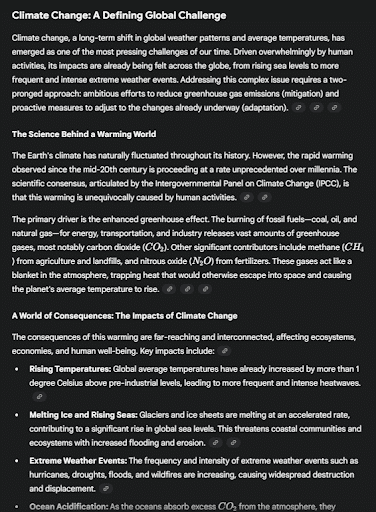
Better text prompt: Write a 300-word explanation of climate change for middle school students, focusing on causes and everyday impacts. Use simple language and relatable examples like weather changes they might notice. (see output below)

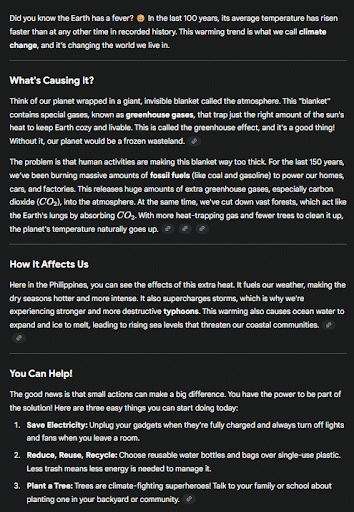
Pro-level text prompt:
Write a 300-word explanation of climate change for middle school students.
Structure:
- Opening hook with surprising fact2 paragraphs on causes (focus on human activities)1 paragraph on local impacts they’d recognize
- Closing with 3 simple actions they can take
- Tone: Informative but not preachy, slightly conversational
- Avoid: Technical jargon, doom scenarios, political angles* (see output below)
Examples of Image Prompts
The common pitfalls of image prompts are over-describing, conflicting instructions and forgetting composition. For example:
Over-describing:
Wrong: A beautiful amazing spectacular gorgeous stunning cat with incredible magnificent fur
Right: An elegant Persian cat with flowing silver fur, studio lighting
Conflicting instructions:
Wrong: Photorealistic cartoon of a dragon
Right: A dragon in Pixar animation style OR A photorealistic dragon
Forgetting composition:
Wrong: A mountain and a lake and trees and a cabin
Right: A cozy cabin in the foreground, surrounded by pine trees, with a lake in the middle ground and mountains in the background
More Examples
Basic image prompt: A cat (see output below)
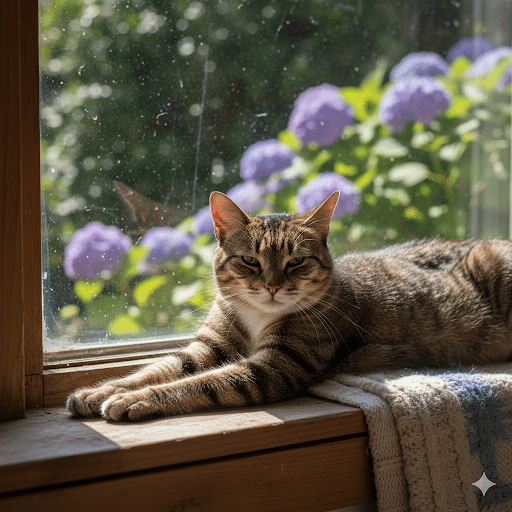
Better image prompt: A fluffy orange cat sitting in a sunny window, photorealistic style (see output below)

Pro-level image prompt:
A majestic long-haired orange tabby cat lounging on a vintage windowsill, golden afternoon sunlight streaming through lace curtains, dust motes visible in the light rays, photorealistic style, shot with 85mm lens, shallow depth of field, warm color grading, 16:9 aspect ratio (see output below)

Each detail shapes the final image significantly.
We aim to become an AI-Empowered Service Provider so learn more advanced AI Training!